Timeline S
Split, slice, move, duplicate
Cut regions at the playhead or selection, slice on transients, and drag clips with magnetic snap to bars, beats, or zero crossings.
Features / v0.9.27
Each feature in ForgeDAW serves one goal: get from raw take to finished vocal faster, with fewer clicks and zero compromise on sound quality.
01 / Editing
The waveform editor is the heart of ForgeDAW. Fast, direct, and sample-accurate.
Timeline S
Cut regions at the playhead or selection, slice on transients, and drag clips with magnetic snap to bars, beats, or zero crossings.
Regions
Click-drag fade handles on region edges, automatic crossfades where clips overlap, and clip gain envelopes for level rides inside a single region.
Sample editor
Spectral view, pencil draw, split layout, A/B compare, Megaphone presets, and revert for destructive edits — without disturbing the rest of your arrangement.
Arrange
Select multiple clips, copy the block, and paste at the playhead — or duplicate an entire section in one undo step.
02 / Vocal repair
Built-in vocal realism repair — classical DSP plus optional localized resynthesis on damaged passages.
Analyze
Pitch, vibrato, register transitions, and harshness mapped onto the waveform with color overlays — chest, belt, falsetto, and likely artifacts.
Repair
Dynamic spectral processing, formant correction, and pitch humanization. Learn from a clean reference selection to calibrate register behavior.
03 / Recording
Capture the perfect take without leaving the session.
Input R
Arm any track and hit record. Input meters show levels before you commit. Metronome with count-in follows session tempo.
Punch
Define a punch range on the ruler and drop into a specific section. Fix one line without re-recording the whole verse.
Takes
Loop-record stacks multiple passes on separate lanes. Promote the best take and mute the rest — comping built into the workflow.
04 / Mixing
A real mixer under the hood — FX Rack modules, live graphs, and Mix Doctor for gain staging.
Routing
Route tracks through group buses. Post-fader send levels for parallel compression, reverb, or delay — pre/post switching lands in a future release.
FX Rack
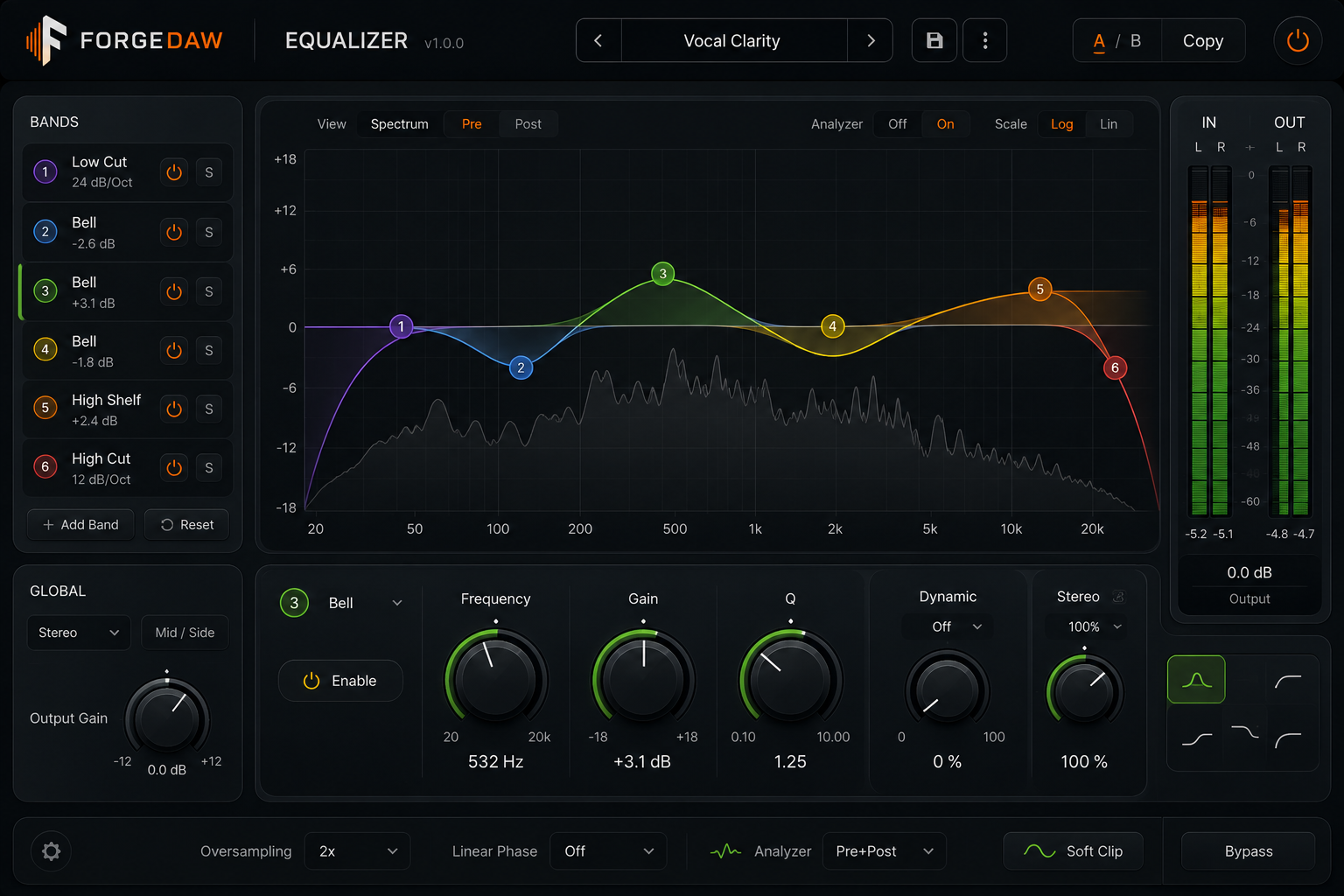
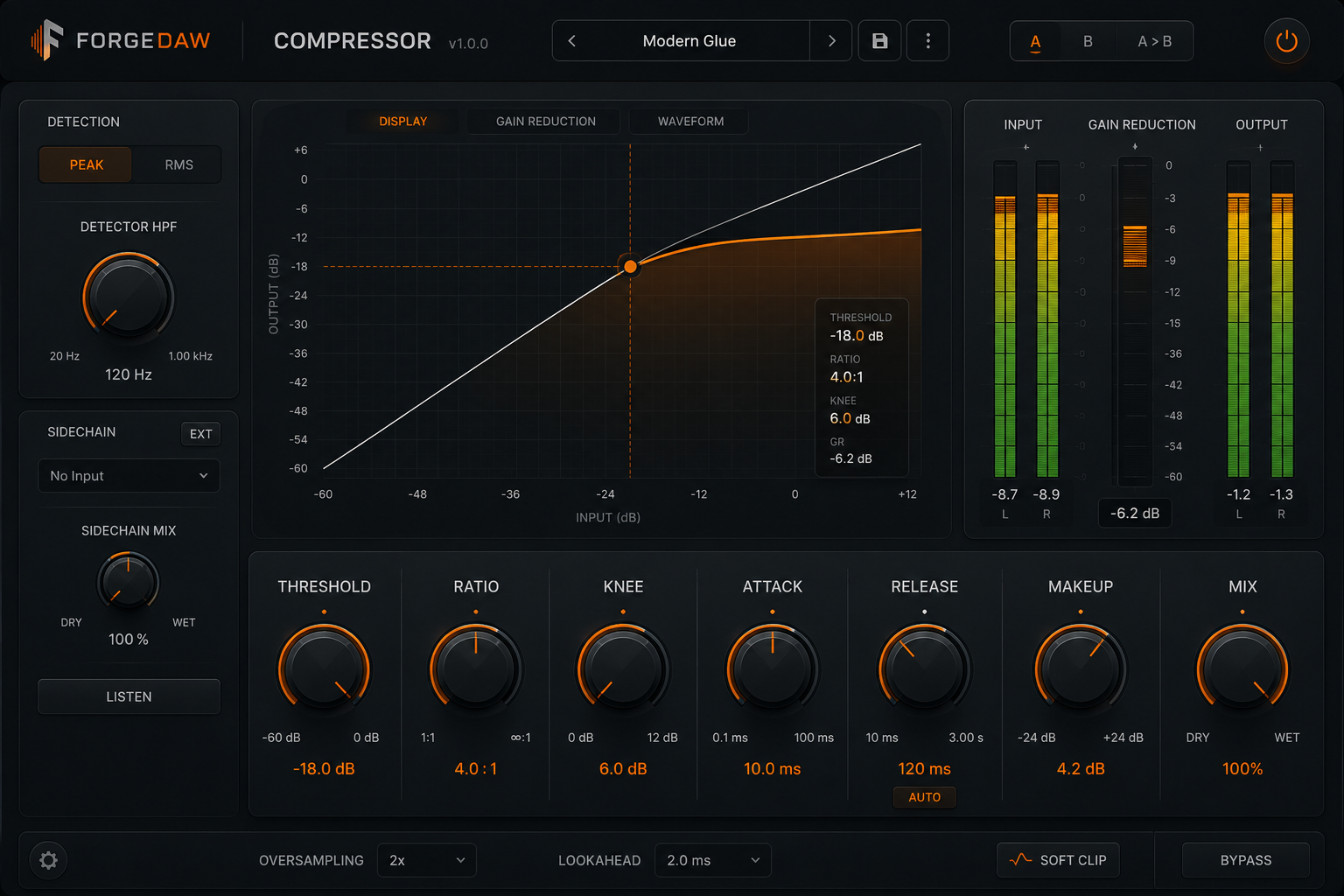
EQ, compressor, gate, delay, reverb, and limiter as side-by-side modules with live knobs and compressor transfer-curve graphs.
ForgeMaster
Integrated LUFS, loudness range, true peak, spectral balance, resonance detection, and vocal masking — with profiles for Spotify, EBU R128, ATSC A/85, podcast, and club playback.
Streaming Master
Apply notch cuts, makeup gain toward the profile target, and a lookahead limiter on the master — one undo step, replaces the previous ForgeMaster chain on rerun.
Mix Doctor
Scan every track for peak, RMS, DC offset, and clipping. Apply corrections to -6 dBFS tracks and -1 dBFS master — styled report dialog with Apply Corrections.
FX Rack
Six-band equalizer graph with draggable nodes and spectrum overlay — low, mid, and high gain wired to the three-band insert today. Compressor modules show live transfer curves and conic knobs.
05 / Output
Your work is safe, portable, and ready to hand off.
Sessions
Each session is a self-contained folder with audio, settings, and mix state. Copy the folder, open it anywhere.
Render
Bounce the full mix to 16/24-bit WAV or 320 kbps MP3 via LAME. Offline render uses the same engine as realtime playback.
Tempo
Set BPM from Transport or detect it when importing tagged loops. Snap grid and metronome follow the session tempo.